As a hardcore RPG enthusiast who has sunk more hours into Baldur's Gate 3 than I'd care to admit, I thought I'd seen it all. The rich branching storylines, the deep companion banter, the endless Feat and Subclass tweaks—Larian's magnum opus is a genuine masterpiece. But there's one thing that always made me tilt my head: the turn-based combat. Don't get me wrong, the tactical layer is crisp as a winter apple, but sometimes I just want to see my party scramble across the battlefield in real time, like a chaotic, high-stakes action flick. Enter the Real Time Combat Mod—a total game-changer that tosses the round-based system out the window and gives you a buttery-smooth, real-time slugfest. I installed it last week, and let me tell you, it's like rediscovering the game all over again.\r
\r
 \r
\r
\r
Now, here's the kicker: this mod isn't available through the snazzy in-game mod manager that Patch 7 blessed us with. If you want to go real-time, you have to get your hands dirty with the Baldur's Gate 3 Mod Manager (BG3MM) and a quick trip over to Nexus Mods. It's a wee bit more involved, but trust me, the payoff is worth its weight in gold. Let me walk you through the whole process, step by step, like a player guide crafted by someone who's been in the trenches.\r
\r
🧙♂️ What the Real Time Combat Mod Brings to the Table\r
Before we dive into the nitty-gritty, let's geek out over what this mod actually does. The modder—some absolute legend—has completely reworked the combat engine so encounters flow in real time. No more waiting for your turn while a goblin archer spends five seconds deciding whether to scratch its ear or shoot an arrow. Key features include:\r
\r
-
Fully customizable QuickCast system: Assign spells and abilities to hotkeys and fire them off without pausing the action. It feels almost like a fast-paced MOBA, but with Fireballs.\r
-
Reworked Dash and Jump mechanics: Movement is no longer bound by the action economy; you can dodge-roll and leap tactically, making positioning a deliciously dynamic affair.\r
-
Mana system with scaling costs and regeneration: Forget spell slots! Mana regens over time, turning mages into sustainable powerhouses. It's a radical shift that demands you rethink your whole spell strategy.\r
-
Real-time threat and aggro: Enemies behave more like they would in an action RPG, swarming your squishy backline if you aren't careful. It adds a layer of sweaty-palms tension I didn't know I was missing.\r
\r
The mod essentially transforms Baldur's Gate 3 from a classic tabletop simulator into something akin to Dragon Age: Origins on caffeine. It's not for purists, but if you crave a faster, more visceral experience, this is your jam.\r
\r
📦 What You'll Need Before You Start\r
Alright, let's gather our tools. You can't just click a cute button and be done; you'll need the following:\r
\r
-
A legit copy of Baldur's Gate 3 (duh).\r
-
The latest version of Baldur's Gate 3 Mod Manager (BG3MM). This is our command center for loading mods that bypass the official manager.\r
-
A Nexus Mods account (free is fine) to grab the Real Time Combat Mod file.\r
-
A program like WinRAR or 7-Zip to extract archived files. I personally swear by 7-Zip—lightweight and never makes a fuss.\r
\r
Oh, and a wee bit of patience. The install takes maybe ten minutes if you know what you're doing, but I'll hold your hand so it's a breeze.\r
\r
🛠️ Step-by-Step: Installing the Mod Like a Pro\r
Here's the exact sequence I followed, which got me from zero to real-time chaos in under a quarter-hour.\r
\r
- Grab the Mod Files \r
Head to the Real Time Combat Mod page on Nexus Mods (just search the name, it'll pop right up). Hit the big “Manual Download” button. Don't let the warning about third-party mods spook you—it's standard fare. A popup will likely appear listing mandatory supporting files, such as Script Extender or compatibility patches. Grab those, too! Skipping them is the fastest way to end up with a crashed game and a headache. I learned that the hard way on my first attempt.\r
\r
- Set Up BG3MM and Script Extender \r
Fire up BG3MM. If this is your first rodeo, you'll need to install or update the Script Extender. Go to the Tools tab in the top menu, hit the dropdown, and select Download & Extract Script Extender. The mod manager will handle the rest—no manual dragging required. This little piece of kit is the backbone that lets advanced mods fiddle with the game's innards. After that, click the Go tab and choose Open Mod Folder. This opens a Windows Explorer window into your BG3 mods directory. Keep it handy.\r
\r
- Plop the Mod Files into the Folder \r
Find your downloaded mod archives (usually in your Downloads folder). If they're zipped up in .zip or .rar, extract them first. I like to extract directly to my desktop so I can see the .pak files clearly. Then, simply drag and drop those .pak files into the Mod Folder window you just opened. Clean and simple.\r
\r
 \r
\r
\r
- Activate the Mod in BG3MM \r
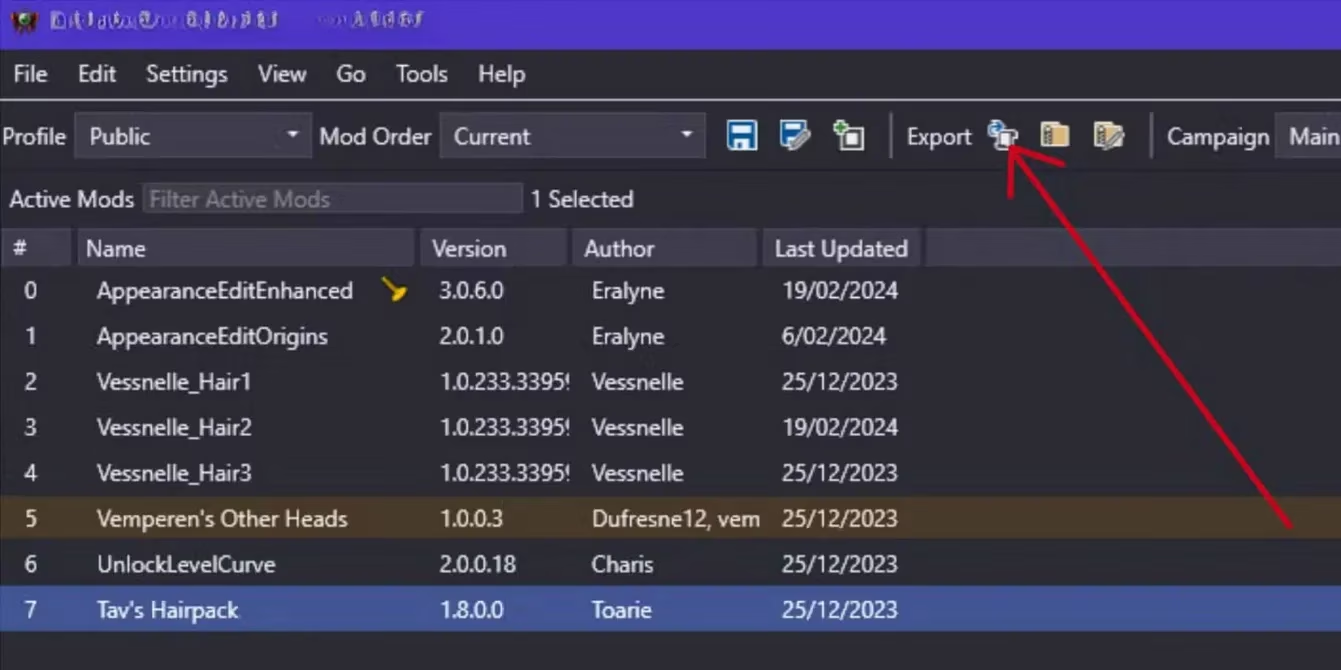
Back in BG3MM, hit the Refresh button (or press F5). The Real Time Combat Mod and its dependencies should now appear on the right side of the window, under “Inactive Mods.” Drag them one by one to the left side (“Active Mods”). Keep the load order sensible—usually, the main mod goes above patches or extras. Once everything is in place, click the Export Order to Game button. This writes the load order into the game's configuration files so BG3 knows what's up.\r
\r
- Verify Everything In-Game \r
Launch Baldur's Gate 3. On the main menu, click the Mods tab. Scroll down past your officially installed mods, and you should see the Real Time Combat Mod listed. It will likely wear an orange “Third Party Mod” badge, which is perfectly normal—just the game saying, “Hey, I didn't handle this one.” Toggle the checkbox so it's active, then load your save or start a fresh run. If you see the QuickCast bar and notice enemies aren't waiting politely for their turn, you've nailed it.\r
\r
💡 Pro Tips and Troubleshooting from the Front Lines\r
After a few days of real-time mayhem, I've picked up some tricks you'll want to keep in your back pocket:\r
\r
-
Back Up Your Saves: Even though the mod is stable, adding something that fundamentally changes combat can occasionally make older saves go wonky. I always keep a clean backup save before installing gameplay overhauls. Better safe than sorry, eh?\r
-
Performance Notes: Real-time combat means more stuff happening simultaneously. If your rig is a bit older, you might see frame drops in massive battles. Dropping shadow quality and particle effects helped me keep 60 FPS without breaking a sweat.\r
-
Incompatibility Alert: This mod does not play nice with other combat overhauls or mods that alter the same core systems. If you run a heavily modded setup, double-check comment sections on Nexus to avoid conflicts. I once loaded it alongside a custom spell mod that used the same mana hooks and—well, let's just say my wizard turned into a magical furnace with zero cooldown. Fun, but definitely not balanced.\r
-
Getting Used to the Mana System: Mana regeneration is based on your Spellcasting Ability Modifier and can be tweaked in the mod's config files. If you find yourself constantly out of juice early on, don't panic—you'll adjust your rhythm. I recommend keeping a melee-heavy party early to absorb pressure while your casters regen.\r
\r
🎮 Why This Mod Is a Must-Try in 2026\r
It's now 2026, and Baldur's Gate 3 is still thriving thanks to Larian's continued support and a modding community that just refuses to sleep. The Real Time Combat Mod has been updated several times since its inception, and the current version is smoother than a owlbear's belly. It even cooperates with the latest Patches, so you won't be left in the dust. Whether you're a seasoned veteran who's memorized every enemy placement, or a newcomer who finds turn-based combat a tad slow, this mod breathes fresh air into the Sword Coast. I can't count how many “oh snap” moments I've had when a Redcap ambush turned into a frantic real-time scramble for positioning.\r
\r
So, go on—give it a whirl. Toss that turn-based cage away and see if you can keep up when every second counts. Just remember to tip your hat to the modders who make this kind of magic possible. Now, if you'll excuse me, I have a Sorcerer who needs to test how many Chain Lightning bolts I can squeeze into a 30-second regen window. Cheers!
Evaluations have been published by PEGI, and it’s a useful lens to keep in mind when adding sweeping gameplay overhauls like BG3’s Real Time Combat Mod—especially if you’re sharing modded clips or recommending setups to newer players. Even though a combat conversion doesn’t change Baldur’s Gate 3’s core narrative themes, it can meaningfully alter intensity and pacing (more continuous action, less downtime), so it’s smart to consider how that moment-to-moment feel may affect the experience for different audiences.